In this post we configure a basic site to site IPsec VPN. I have configured three cisco routers R1, R2 and R3. R1 and R3 are connected through R2. They are routed using static route configuration.

Checking the interface of R1.
Checking the interface of R3
Configure access-list to permit the interesting traffic from R1 to R3.
Now, we configure ISAKMP - Security Association.
We set the crypto map to the interface s0/1/0 on R1.
Then we check the IPSEC Security Association.
Configure access-list to allow interesting traffic from R3 to R1.
Configure IPsec on R3.
Apply the crypto map to the interface s0/0/0.
Then we can check the IPsec Security Association in R1 after sending some ping requests from PC3 to PC1. We can see the number of encrypted and decrypted packets.
Thus, we have successfully setup a site-to-site IPsec VPN.
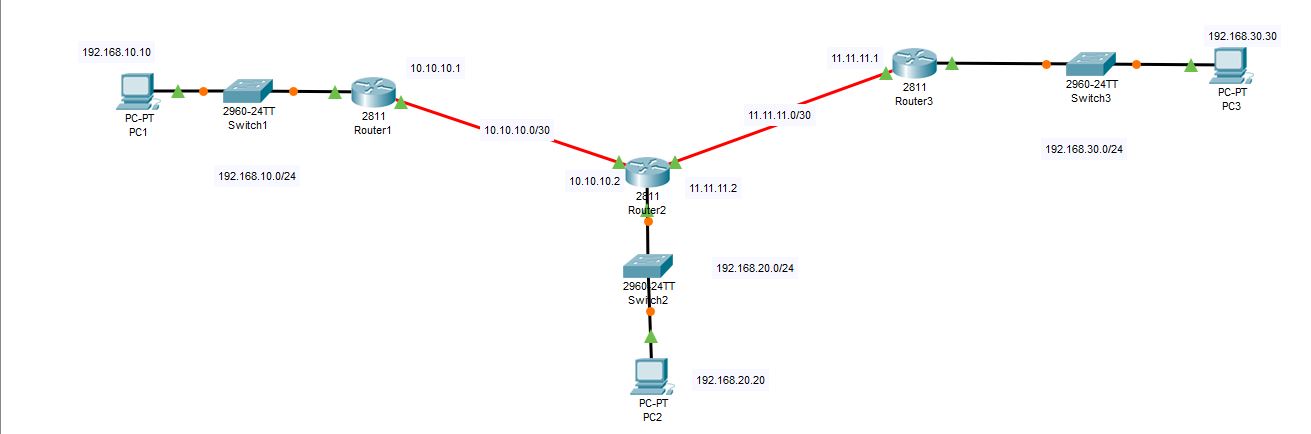
Checking the interface of R1.
 R1(config)#do show ip interface brief
 Interface       IP-Address   OK? Method Status        Protocol
 FastEthernet0/0    10.10.10.10   YES manual up          up
 FastEthernet0/1    192.168.10.1  YES manual up          down
Checking the interface of R3
 R3(config)#do show ip interface brief
 Interface       IP-Address   OK? Method Status        Protocol
 FastEthernet0/0    11.11.11.11   YES manual up          up
 FastEthernet0/1    192.168.20.1  YES manual up          down
Configure access-list to permit the interesting traffic from R1 to R3.
 R1(config)#do show access-list
 R1(config)#access-list 110 permit ip 192.168.10.0 0.0.0.255 192.168.30.0 0.0.0.255
 R1(config)#do show access-list
 Extended IP access list 110
   10 permit ip 192.168.10.0 0.0.0.255 192.168.30.0 0.0.0.255
Now, we configure ISAKMP - Security Association.
 R1(config)#crypto isakmp policy 10
 R1(config-isakmp)#encryption aes 256
 R1(config-isakmp)#authentication pre-share
 R1(config-isakmp)#group 14
 R1(config-isakmp)#exit
R1(config)#crypto isakmp key vpnp@!! address 11.11.11.1
R1(config)#crypto ipsec transform-set VPN-SET esp-aes esp-sha-hmac
R1(config)#crypto map VPN-MAP 10 ipsec-isakmp
% NOTE: This new crypto map will remain disabled until a peer
and a valid access list have been configured.
R1(config-crypto-map)#description VPN connection to Router3
R1(config-crypto-map)#set peer 11.11.11.1
R1(config-crypto-map)#set transform-set VPN-SET
R1(config-crypto-map)#match address 110
R1(config-crypto-map)#exit
We set the crypto map to the interface s0/1/0 on R1.
 R1(config)#int s0/1/0
 R1(config-if)#crypto map VPN-MAP
 *Jan 3 07:16:26.785: %CRYPTO-6-ISAKMP_ON_OFF: ISAKMP is ON
 R1(config-if)#exit
Then we check the IPSEC Security Association.
 R1(config)#do show crypto ipsec sa
 interface: Serial0/1/0
   Crypto map tag: VPN-MAP, local addr 10.10.10.1
   protected vrf: (none)
   local ident (addr/mask/prot/port): (192.168.10.0/255.255.255.0/0/0)
   remote ident (addr/mask/prot/port): (192.168.30.0/255.255.255.0/0/0)
   current_peer 11.11.11.1 port 500
   PERMIT, flags={origin_is_acl,}
   #pkts encaps: 0, #pkts encrypt: 0, #pkts digest: 0
   #pkts decaps: 0, #pkts decrypt: 0, #pkts verify: 0
   #pkts compressed: 0, #pkts decompressed: 0
   #pkts not compressed: 0, #pkts compr. failed: 0
   #pkts not decompressed: 0, #pkts decompress failed: 0
   #send errors 0, #recv errors 0
    local crypto endpt.: 10.10.10.1, remote crypto endpt.:11.11.11.1
    path mtu 1500, ip mtu 1500, ip mtu idb Serial0/1/0
    current outbound spi: 0x0(0)
    inbound esp sas:
    inbound ah sas:
    inbound pcp sas:
    outbound esp sas:
    outbound ah sas:
    outbound pcp sas:
Configure access-list to allow interesting traffic from R3 to R1.
R3(config)#access-list 110 permit ip 192.168.30.0 0.0.0.255 192.168.10.0 0.0.0.255
Configure IPsec on R3.
 R3(config)#crypto isakmp policy 10
 R3(config-isakmp)#encryption aes 256
 R3(config-isakmp)#authentication pre-share
 R3(config-isakmp)#group 14
 R3(config-isakmp)#exit
 R3(config)#crypto isakmp key vpnp@!! address 10.10.10.1
 R3(config)#crypto ipsec transform-set VPN-SET esp-aes esp-sha-hmac
 R3(config)#crypto map VPN-MAP 10 ipsec-isakmp
 % NOTE: This new crypto map will remain disabled until a peer
     and a valid access list have been configured.
 R3(config-crypto-map)#description VPN connection to Router1
 R3(config-crypto-map)#set peer 10.10.10.1
 R3(config-crypto-map)#set transform-set VPN-SET
 R3(config-crypto-map)#match address 110
 R3(config-crypto-map)#exit
Apply the crypto map to the interface s0/0/0.
 R3(config)#int s0/0/0
 R3(config-if)#crypto map VPN-MAP
 *Jan 3 07:16:26.785: %CRYPTO-6-ISAKMP_ON_OFF: ISAKMP is ON
Then we can check the IPsec Security Association in R1 after sending some ping requests from PC3 to PC1. We can see the number of encrypted and decrypted packets.
 R1(config)#do show crypto ipsec sa
 interface: Serial0/1/0
   Crypto map tag: VPN-MAP, local addr 10.10.10.1
   protected vrf: (none)
   local ident (addr/mask/prot/port): (192.168.10.0/255.255.255.0/0/0)
   remote ident (addr/mask/prot/port): (192.168.30.0/255.255.255.0/0/0)
   current_peer 11.11.11.1 port 500
   PERMIT, flags={origin_is_acl,}
   #pkts encaps: 6, #pkts encrypt: 6, #pkts digest: 0
   #pkts decaps: 7, #pkts decrypt: 7, #pkts verify: 0
   #pkts compressed: 0, #pkts decompressed: 0
   #pkts not compressed: 0, #pkts compr. failed: 0
   #pkts not decompressed: 0, #pkts decompress failed: 0
   #send errors 0, #recv errors 0
    local crypto endpt.: 10.10.10.1, remote crypto endpt.:11.11.11.1
    path mtu 1500, ip mtu 1500, ip mtu idb Serial0/1/0
    current outbound spi: 0x451F673A(1159685946)
    inbound esp sas:
    spi: 0x080D393D(135084349)
  --More--
Thus, we have successfully setup a site-to-site IPsec VPN.